MT5 內建的均線、ATR 之外,想在圖上畫自己算的線,或讓好幾隻 EA 共用同一套計算,就寫自訂指標。這篇把通道突破寫成指標:通道是前 20 根 K 線的最高點與最低點,收盤剛站上上軌、剛跌破下軌就畫一個箭頭;再寫一隻 EA 用 CiCustom 讀箭頭下單。
範例兩個檔:指標 ChannelBreak.mq5、EA ChannelInd.mq5。EA 的下單、停損、移動停損都交給共用框架 EaKit.mqh,自己只負責讀訊號。文中的日誌都是策略測試器的實際輸出。
先把指標掛上圖表
- ChannelBreak.mq5 放到
MQL5\Indicators\Blog\(Blog 資料夾自己建),在 MetaEditor 打開按F7。 - 導航的「指標」底下會多一個 Blog 資料夾,把 ChannelBreak 拖到 EURUSD H1 圖表上,按確定。
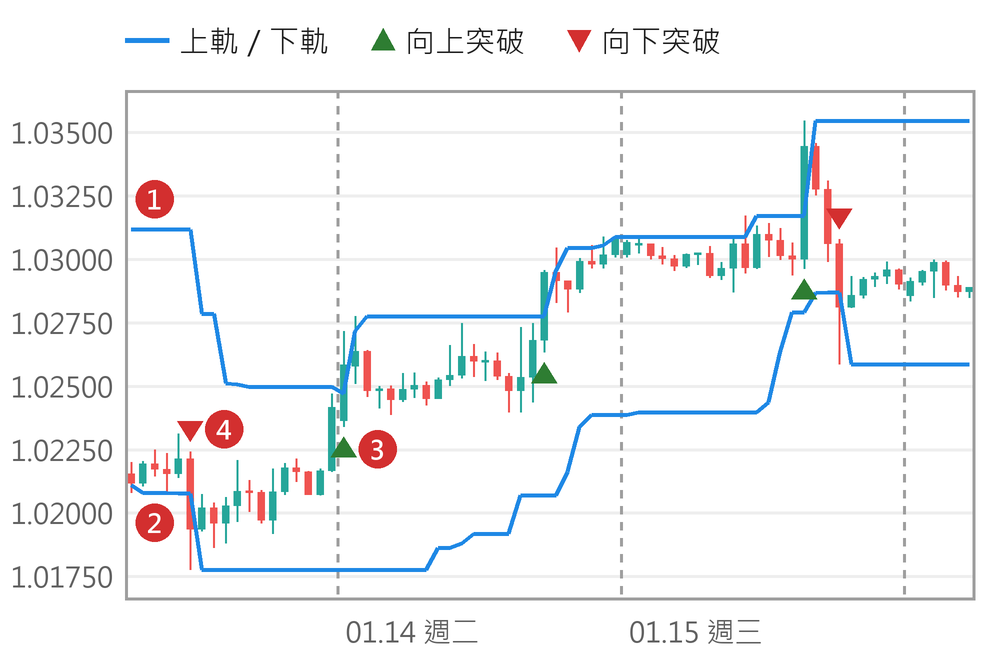
1. 檔頭的 #property:畫在哪、畫幾條
//=== 1. 檔頭的 #property:畫在哪、畫幾條 ============================
#property indicator_chart_window      // 畫在主圖(K 線上)
#property indicator_buffers 4         // 緩衝區(存數值的陣列)
#property indicator_plots   4         // 圖上畫幾樣
#property indicator_label1  "上軌"
#property indicator_type1   DRAW_LINE
#property indicator_color1  clrDodgerBlue
#property indicator_label2  "下軌"
#property indicator_type2   DRAW_LINE
#property indicator_color2  clrDodgerBlue
#property indicator_label3  "向上突破"
#property indicator_type3   DRAW_ARROW
#property indicator_color3  clrLime
#property indicator_width3  2
#property indicator_label4  "向下突破"
#property indicator_type4   DRAW_ARROW
#property indicator_color4  clrRed
#property indicator_width4  2

input int i_Channel = 20;             // 通道看幾根 K 線

double g_Upper[];
double g_Lower[];
double g_Buy[];
double g_Sell[];
indicator_chart_window 表示畫在 K 線那個視窗;RSI 那種畫在下方另一個視窗的,改寫 indicator_separate_window。
indicator_buffers 是存數值的陣列有幾個,indicator_plots 是圖上畫幾樣;這裡都是 4:上軌、下軌、向上箭頭、向下箭頭。後面 label、type、color 結尾的數字是第幾樣,從 1 起算。DRAW_LINE 把每根 K 線的值連成線,DRAW_ARROW 在有值的 K 線畫一個符號。
指標的 input 跟 EA 一樣,掛上圖表時可以改。
2. OnInit:把陣列接成緩衝區
//=== 2. OnInit:把陣列接成緩衝區 ====================================
int OnInit()
{
   if(i_Channel < 1)
      return INIT_PARAMETERS_INCORRECT;
   SetIndexBuffer(0, g_Upper, INDICATOR_DATA);
   SetIndexBuffer(1, g_Lower, INDICATOR_DATA);
   SetIndexBuffer(2, g_Buy,   INDICATOR_DATA);
   SetIndexBuffer(3, g_Sell,  INDICATOR_DATA);
   PlotIndexSetInteger(2, PLOT_ARROW, 233);   // Wingdings 向上箭頭
   PlotIndexSetInteger(3, PLOT_ARROW, 234);   // 向下箭頭
   PlotIndexSetInteger(2, PLOT_ARROW_SHIFT, 15);  // 往下挪 15 像素
   PlotIndexSetInteger(3, PLOT_ARROW_SHIFT, -15); // 往上挪
   PlotIndexSetDouble(2, PLOT_EMPTY_VALUE, 0.0);  // 0=這根沒箭頭
   PlotIndexSetDouble(3, PLOT_EMPTY_VALUE, 0.0);
   for(int k = 0; k < 4; k++)                 // 前 N 根沒得算,不畫
      PlotIndexSetInteger(k, PLOT_DRAW_BEGIN, i_Channel);
   IndicatorSetString(INDICATOR_SHORTNAME,
                      "ChannelBreak(" + (string)i_Channel + ")");
   return INIT_SUCCEEDED;
}
SetIndexBuffer 把全域陣列接到第幾個緩衝區(從 0 起算,比 #property 的編號少 1)。接上之後陣列大小由 MT5 管,K 線多一根陣列就多一格,不用 ArrayResize。
PLOT_ARROW 是 Wingdings 字型的字碼,233 是向上箭頭、234 是向下;PLOT_ARROW_SHIFT 把箭頭往下(正數)或往上(負數)挪幾個像素,免得壓在影線上。
PLOT_EMPTY_VALUE 是「這根不畫」的值。線用預設的 EMPTY_VALUE,箭頭改成 0,原因在第 4 節。PLOT_DRAW_BEGIN 讓前 20 根不畫,那幾根還湊不滿一個通道。
3. OnCalculate:只算還沒算過的 K 線
//=== 3. OnCalculate:只算還沒算過的 K 線 ============================
int OnCalculate(const int rates_total, const int prev_calculated,
                const datetime &time[], const double &open[],
                const double &high[], const double &low[],
                const double &close[], const long &tick_volume[],
                const long &volume[], const int &spread[])
{
   if(rates_total <= i_Channel)
      return 0;                       // K 線不夠,下次從頭再來
   int start = prev_calculated - 1;   // 上次最後一根要重算
   if(prev_calculated == 0)
   {
      for(int i = 0; i < i_Channel; i++)
      {
         g_Upper[i] = EMPTY_VALUE;
         g_Lower[i] = EMPTY_VALUE;
         g_Buy[i]   = 0.0;
         g_Sell[i]  = 0.0;
      }
      start = i_Channel;
   }
   for(int i = start; i < rates_total; i++)   // 索引 0 是最舊的
   {
      // 前面 N 根(不含這根)的最高、最低
      g_Upper[i] = high[ArrayMaximum(high, i - i_Channel, i_Channel)];
      g_Lower[i] = low[ArrayMinimum(low, i - i_Channel, i_Channel)];
      g_Buy[i]   = 0.0;
      g_Sell[i]  = 0.0;
      if(i == i_Channel)
         continue;                    // 前一根沒有通道,不比
      if(close[i - 1] <= g_Upper[i - 1] && close[i] > g_Upper[i])
         g_Buy[i] = low[i];           // 剛收上上軌:箭頭畫在低點下
      if(close[i - 1] >= g_Lower[i - 1] && close[i] < g_Lower[i])
         g_Sell[i] = high[i];
   }
   return rates_total;                // 下次的 prev_calculated
}
每來一個 tick,MT5 就叫一次 OnCalculate,把整段 K 線的時間、開高低收陣列傳進來,rates_total 是現在總共幾根。陣列索引 0 是最舊的那根,rates_total - 1 是最新、還沒收完的那根,跟 EA 裡 Main(1) 從新往舊數正好相反。實測第一次呼叫時 time[0] 是 2024.01.02 00:00,time[rates_total-1] 是 2025.01.03 23:00。
prev_calculated 是上一次 OnCalculate 回傳的值。讓 EA 每個 tick 讀一次指標,指標每次印出這兩個數:
00:00:00  rates_total=6284  prev_calculated=0
00:05:00  rates_total=6285  prev_calculated=6284
00:05:07  rates_total=6285  prev_calculated=6285
00:05:15  rates_total=6285  prev_calculated=6285
01:00:00  rates_total=6286  prev_calculated=6285
02:00:00  rates_total=6287  prev_calculated=6286
第一次是 0,整段 6,284 根全部算;同一根 K 線裡的 tick,prev_calculated 等於 rates_total;換新 K 線時少 1。所以從 prev_calculated - 1 算起,兩種情況都對:同一根只重算最後一根,換根時把剛收完的那根用最終收盤價再算一次,再算新的一根。每次都從頭算也能跑,只是每個 tick 都重算幾千根。
最後一根還沒收完,收盤價一直在變,箭頭可能出現又消失,所以迴圈裡每次重算都先把箭頭清成 0,EA 也只看收完的前一根。K 線不夠時回傳 0,下次 prev_calculated 還是 0,會從頭再來。
4. EA 用 CiCustom 讀自訂指標
//=== 4. EA 用 CiCustom 讀自訂指標 ===================================
#property tester_indicator "Blog\\ChannelBreak.ex5"
#include <Indicators\Custom.mqh>
#include <Indicators\Oscilators.mqh>
#include <OrzBlog\EaKit.mqh>

input int  i_Channel   = 20;          // 通道看幾根 K 線
input int  i_AtrPeriod = 14;          // ATR 期數
input long i_Magic     = 20250803;    // 魔術碼,別跟別隻 EA 撞

CEaKit   g_Kit;
CiCustom g_Chan;
CiATR    g_Atr;

int OnInit()
{
   MqlParam par[2];
   par[0].type          = TYPE_STRING;  // 第 1 個一定是指標路徑
   par[0].string_value  = "Blog\\ChannelBreak";
   par[1].type          = TYPE_INT;     // 之後照指標 input 的順序
   par[1].integer_value = i_Channel;
   if(!g_Chan.NumBuffers(4) ||
      !g_Chan.Create(_Symbol, _Period, IND_CUSTOM, 2, par) ||
      !g_Atr.Create(_Symbol, _Period, i_AtrPeriod))
   {
      Print("指標建立失敗,錯誤碼 ", GetLastError());
      return INIT_FAILED;
   }
   return g_Kit.Init(i_Magic) ? INIT_SUCCEEDED : INIT_FAILED;
}

void OnDeinit(const int reason) { g_Kit.Deinit(); }
void OnTimer()                  { g_Kit.OnTimer(); }

void OnTradeTransaction(const MqlTradeTransaction &trans,
                        const MqlTradeRequest &request,
                        const MqlTradeResult &result)
{
   g_Kit.OnTrade(trans);
}

void OnTick()
{
   if(!g_Kit.Ready())
      return;
   g_Kit.ShowStatus();
   if(!g_Kit.IsNewBar())
      return;

   g_Chan.Refresh();
   g_Atr.Refresh();
   double buy  = g_Chan.GetData(2, 1);  // 緩衝區 2、前一根
   double sell = g_Chan.GetData(3, 1);
   double atr1 = g_Atr.Main(1);
   if(buy == EMPTY_VALUE || sell == EMPTY_VALUE ||   // 讀不到
      atr1 == EMPTY_VALUE)
   {
      Print("資料還沒準備好,錯誤碼 ", GetLastError());
      g_Kit.ForgetBar();
      return;
   }

   int dir = -1;                        // 0=沒箭頭
   if(buy != 0.0)  dir = POSITION_TYPE_BUY;
   if(sell != 0.0) dir = POSITION_TYPE_SELL;
   g_Kit.OnSignal(dir, atr1);
}
CiCustom 建立時要一個 MqlParam 陣列:第 1 個一定是指標路徑(相對 MQL5\Indicators\,不寫 .ex5),之後照指標 input 的順序給值。NumBuffers(4) 要在 Create 之前叫,告訴它指標有幾個緩衝區。GetData(2, 1) 是第 2 號緩衝區(向上箭頭)的前一根,K 線跟 Main(1) 一樣從新往舊數。
不用類別也可以:iCustom(_Symbol, _Period, "Blog\\ChannelBreak", 20) 拿到 handle,指標的 input 直接接在後面當參數,再用 CopyBuffer 讀。
#property tester_indicator 是給策略測試器看的,告訴它這隻 EA 會用到哪個指標。官方文件說:用 iCustom 而且路徑是寫死的字串,測試器自己找得到;其他寫法(CiCustom 就是)要寫這一行。實測在自己電腦上,拿掉這行也照跑,結果跟有寫一樣,因為指標檔就在本機的 Indicators 資料夾;把指標檔也拿掉,就是下面這種 4802。這行是為測試交給其他電腦跑的情況寫的,照文件寫上就好。
路徑打錯,測試器在 OnInit 就停了,連 EA 自己的錯誤訊息都沒機會印:
custom indicator 'Blog\ChannelBrk' cannot load [4802]
indicator create error in 'ChannelIndBad.mq5' (1,1)
OnInit critical error
tester stopped because OnInit failed
箭頭的空值用 0,是因為 GetData 讀不到資料時回傳 EMPTY_VALUE。「沒箭頭」也用 EMPTY_VALUE 的話,EA 分不出「沒訊號」和「讀不到」。實測把指標改成沒箭頭填 EMPTY_VALUE、EA 不動,跑一天:每個 tick 都當成讀不到,「資料還沒準備好」印了 127,296 次,一筆也沒做。
5. 跟直接在 EA 裡算的版本比
同樣的通道突破,也可以在 EA 裡用 CiHigh、CiLow 直接算,例如 ChannelKit.mq5。兩隻 EA 同一天、同設定跑(EURUSD H1,2025.01.02 到 2025.01.31,每次報價,入金 10000,杠杆 1:100):都是 19 筆交易、最後餘額 10041.55,428 行的日誌除了指標那一行和測試耗時,逐行相同。
算法搬進指標,結果沒變,多了兩個好處:訊號畫在圖上看得到,別隻 EA 也能讀同一個指標。
本篇檔案:ChannelBreak.mq5 放 MQL5\Indicators\Blog\;ChannelInd.mq5 放 MQL5\Experts\;EaKit.mqh 放 MQL5\Include\OrzBlog\。三個檔都在 MetaEditor 打開按 F7,EA 會用到指標編出來的 ChannelBreak.ex5。